
Hardening an Azure App Service usually means reducing public exposure. In production, that often means disabling public network access and routing traffic through Azure Front Door Private Link, private endpoints, and private DNS.
That is the right move from a security point of view.
But it also changes how deployments work.
When an App Service is no longer publicly reachable, a standard Microsoft-hosted Azure DevOps agent may not be able to reach the App Service deployment endpoint. The important endpoint is usually the SCM/Kudu host:
<app-name>.scm.azurewebsites.netThis is the endpoint used by zip deploy and many Azure App Service deployment tasks.
So the pipeline can still build the application successfully, publish the artifact, and then fail only at the deployment step because the agent cannot resolve or reach the private SCM endpoint.
The fix is simple in principle: run the deployment job from inside the same private network path as the App Service.
That is where Managed DevOps Pools fit well.
The architecture
The production pattern looks like this:
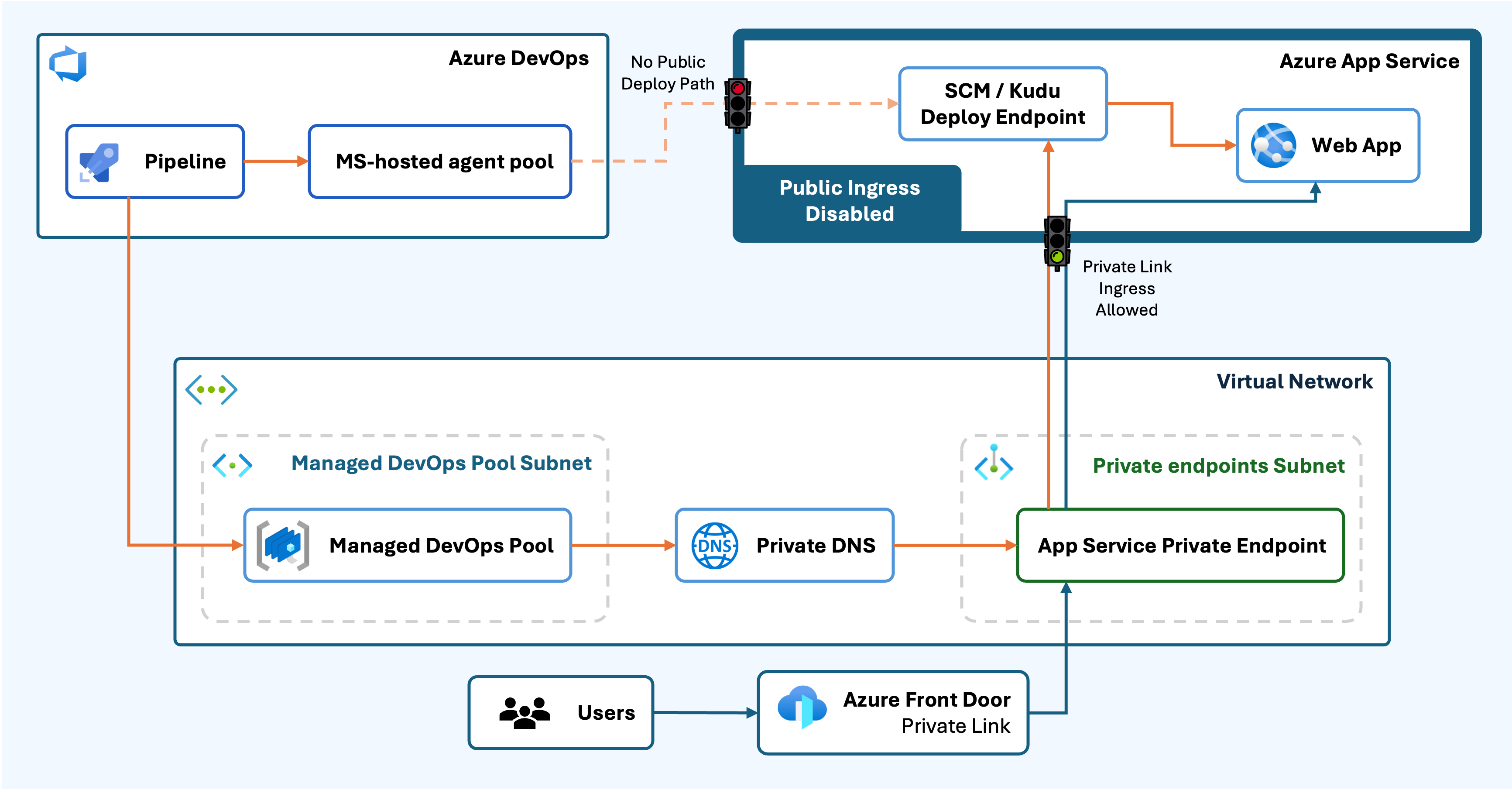
In this setup, the App Service is private by design:
- Public network access is disabled
- Inbound access goes through a private endpoint
- Private DNS resolves the App Service private endpoint
- Azure Front Door Premium provides the public entry point through Private Link
- Outbound App Service traffic uses VNet integration where required
The Azure DevOps deployment job runs on a Managed DevOps Pool:
- The pool is attached to the production virtual network
- Agents are injected into a dedicated subnet
- The subnet is delegated to
Microsoft.DevOpsInfrastructure/pools
That last part is the key.
Once the App Service deployment endpoint is private, the deployment agent also needs to be private. The pipeline is now part of the network architecture.
Infrastructure as code
The infrastructure should make this network boundary clear.
A simplified Bicep example for the Managed DevOps Pool subnet looks like this:
{
  name: 'snet-devops-pool-prod'
  addressPrefix: '10.0.5.0/24'
  delegations: [
    {
      name: 'managed-devops-pool'
      properties: {
        serviceName: 'Microsoft.DevOpsInfrastructure/pools'
      }
    }
  ]
}
The App Service should be configured as private from the platform layer:
resource app 'Microsoft.Web/sites@2023-12-01' = {
  name: appName
  location: location
  properties: {
    serverFarmId: appServicePlanId
    httpsOnly: true
    publicNetworkAccess: 'Disabled'
    virtualNetworkSubnetId: appIntegrationSubnetId
    siteConfig: {
      alwaysOn: true
      vnetRouteAllEnabled: true
      linuxFxVersion: 'PYTHON|3.11'
    }
  }
}
The private endpoint is also part of the core platform contract:
resource appPrivateEndpoint 'Microsoft.Network/privateEndpoints@2023-05-01' = {
  name: 'pe-app-prod'
  location: location
  properties: {
    subnet: {
      id: privateEndpointSubnetId
    }
    privateLinkServiceConnections: [
      {
        name: 'appservice'
        properties: {
          privateLinkServiceId: app.id
          groupIds: [
            'sites'
          ]
        }
      }
    ]
  }
}
The point is not just to make the App Service private. The point is to make the whole deployment path private as well.
If the application endpoint is private but the CI/CD agent is still outside the network, the deployment model is incomplete.
CI/CD flow
A typical setup separates the platform and application pipelines:
- The infrastructure pipeline deploys Bicep or Terraform
- The infrastructure pipeline publishes key outputs as a pipeline artifact
- The backend pipeline downloads those outputs
- The backend pipeline packages the application
- The backend pipeline deploys to App Service using zip deploy
- The frontend pipeline deploys the static frontend and routes API traffic through Front Door
- Worker pipelines build containers and update background services where required
The production backend deployment is where the Managed DevOps Pool matters most:
stages:
- stage: Deploy
  jobs:
  - job: DeployWebApp
    pool:
      name: managed-devops-prod

    steps:
    - download: current
      artifact: backend

    - download: infra
      artifact: infra-prod

    - script: |
        nslookup $(BACKEND_APP_NAME).azurewebsites.net || true
        nslookup $(BACKEND_APP_NAME).scm.azurewebsites.net || true
        curl -I -m 10 https://$(BACKEND_APP_NAME).scm.azurewebsites.net || true
      displayName: Check private App Service connectivity

    - task: AzureWebApp@1
      inputs:
        azureSubscription: $(serviceConnection)
        appType: webAppLinux
        appName: $(BACKEND_APP_NAME)
        package: $(Pipeline.Workspace)/backend/backend.zip
        deploymentMethod: zipDeploy
Keep the connectivity check.
It saves time.
If the deployment fails before the package is pushed, the problem is usually not the application code. It is usually one of these:
- Private DNS is not resolving correctly
- The Managed DevOps Pool is not using the expected subnet
- The private endpoint is missing or misconfigured
- The SCM endpoint is still resolving publicly
- App Service access restrictions are blocking the path
Checking DNS and basic HTTP connectivity from the deployment agent makes the failure obvious.
Managed DevOps Pool setup
The setup is fairly direct:
- Create or reuse the production virtual network.
- Create a dedicated subnet for the Managed DevOps Pool.
- Delegate that subnet to
Microsoft.DevOpsInfrastructure/pools. - Create the Managed DevOps Pool in the same Azure region as the virtual network.
- Configure the pool to inject agents into the existing VNet and subnet.
- Grant the Azure DevOps pipeline permission to use the pool.
- Run a validation job before the real deployment.
A simple validation job is enough:
pool:
  name: managed-devops-prod

steps:
- script: |
    nslookup <app-name>.azurewebsites.net
    nslookup <app-name>.scm.azurewebsites.net
  displayName: Validate private DNS from deployment pool
The Managed DevOps Pool subnet should be dedicated to that purpose. Do not place unrelated resources in it.
Common mistakes
The most common mistake is forgetting about the SCM endpoint.
Teams often test the main application URL:
<app-name>.azurewebsites.netBut the deployment task needs the SCM/Kudu endpoint:
<app-name>.scm.azurewebsites.netBoth need to resolve correctly from the deployment agent.
Another common mistake is having inconsistent environments.
A Microsoft-hosted agent may still work in development if public access is enabled there. That does not prove the production deployment path. If staging, production, or DR use private App Service access, those environments need the same private deployment pattern.
Private DNS is another frequent issue.
The Managed DevOps Pool agent must use DNS that resolves the App Service hostname to the private endpoint. If DNS resolves to the public endpoint while public access is disabled, deployment will fail.
Capacity also matters.
Managed DevOps Pools still need appropriate Azure DevOps parallel job capacity, and fresh agents can take time to start. For production release windows, configure pool capacity and standby agents deliberately.
Why this pattern works well
There are other ways to deploy to a private App Service:
- Temporarily enable public network access
- Allowlist Azure DevOps outbound IP ranges
- Run a custom self-hosted VM agent
- Deploy manually from a jumpbox
All of those can work, but they come with trade-offs.
Temporarily enabling public access weakens the security model. Allowlisting hosted agent IPs can become messy. Self-hosted VM agents need patching and maintenance. Jumpbox deployments are manual and harder to govern.
Managed DevOps Pools are cleaner.
Azure manages the agents, but the agents still run inside your private network boundary. That gives you a better fit for private endpoints, infrastructure as code, and production-grade CI/CD.
Final checklist
Before the first production deployment, confirm the following:
- App Service public network access is disabled intentionally.
- The App Service private endpoint exists.
- The private DNS zone is linked to the VNet.
- The main App Service hostname resolves from the deployment network.
- The SCM hostname resolves from the deployment network.
- The Managed DevOps Pool exists in the same region as the VNet.
- The pool subnet is delegated to
Microsoft.DevOpsInfrastructure/pools. - The Azure DevOps pipeline has permission to use the pool.
- The deployment job uses the Managed DevOps Pool.
- A validation job can resolve
<app-name>.scm.azurewebsites.net. - Non-production and DR environments follow the same pattern if they are also private.
Private App Service deployment is not only an App Service configuration issue.
It is a CI/CD networking issue.
Once the deployment endpoint is private, the deployment agent needs to be private as well.