Long-running AI workflows do not fit neatly inside HTTP request/response APIs.
As soon as an AI feature moves from demo to production, background execution becomes an architecture decision. Generating a complex document section can take minutes. It may call multiple agents, read source documents, update intermediate progress, consume significant model capacity, and still need to be cancellable from the browser.
Keeping that work outside the web request keeps the API responsive and lets the worker tier scale around the shape of the AI workload.
The architecture separates those concerns. The API accepts user intent and persists state. Azure Service Bus stores durable work commands. Azure Container Apps runs the AI worker fleet. Cosmos DB remains the source of truth. Redis and WebSockets deliver live progress to the frontend.
The design is useful because it treats AI generation as a distributed workflow, not just a function call.
The core pattern
The architecture uses three different communication paths, each for a different job:
- Service Bus is the durable command plane. It stores “run this AI job” messages until a worker can process them.
- Cosmos DB is the source of truth. Job status, progress, generated content, step output, errors, and timestamps are persisted there.
- Redis Pub/Sub and WebSockets are the live signal plane. They provide fast, best-effort progress updates to connected browsers.
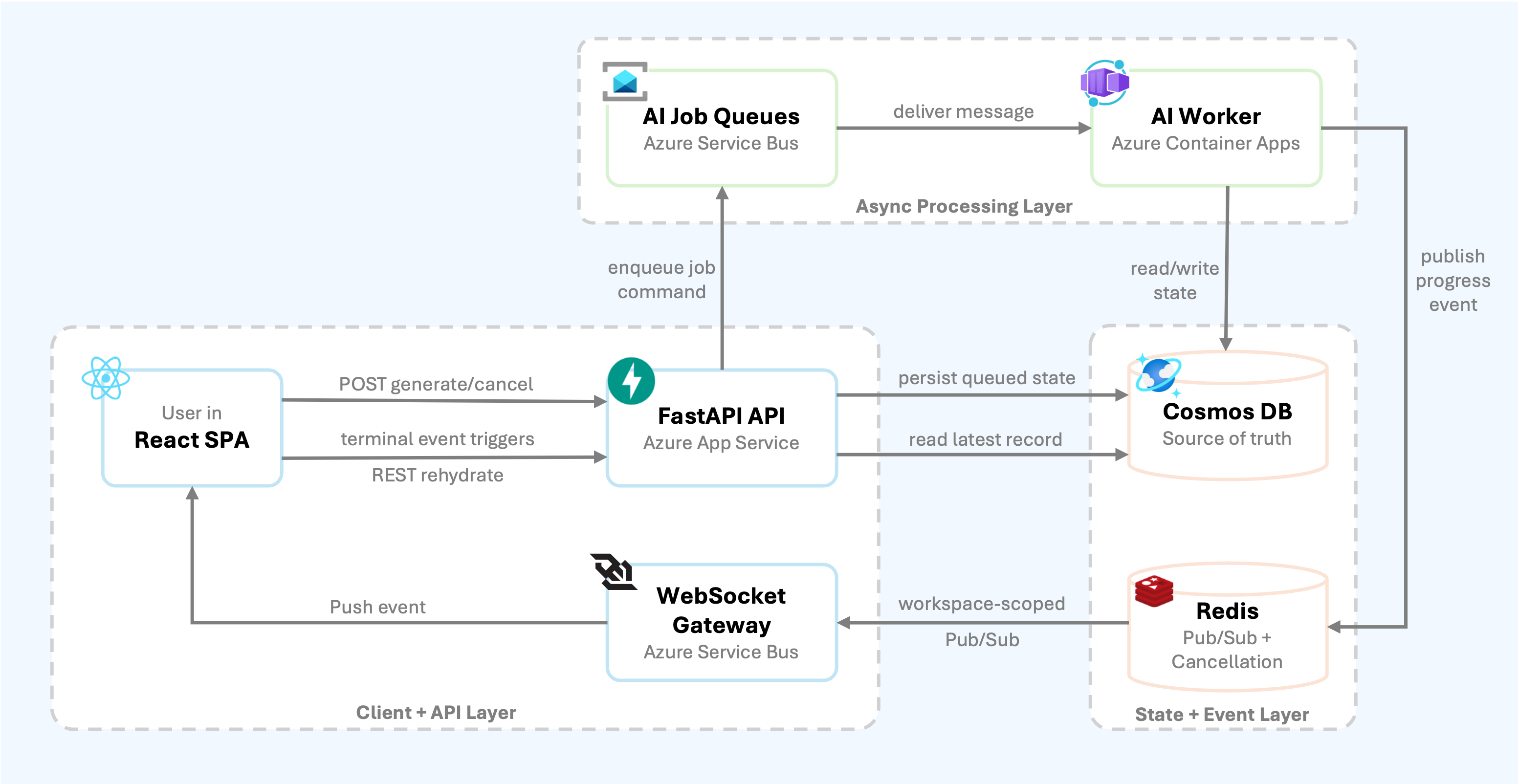
The important detail is that the browser does not trust WebSocket messages as the source of truth. It uses them as hints. On completion, error, or cancellation, it rehydrates the full record over REST.
That gives the system the responsiveness users expect without making the live message channel responsible for correctness.
Why Container Apps for the worker?
The API and worker share the same service layer, but they run in different processes with different scaling behavior.
The API runs on Azure App Service and handles CRUD, chat, authentication, and WebSocket connections. The worker runs as an Azure Container App and only does background AI generation. The worker image is built from a dedicated Dockerfile and deployed independently from the API.
The Container App is configured with:
- A dedicated Container Apps managed environment;
- A user-assigned managed identity for ACR pulls and Key Vault access;
- CPU and memory sized for large document and LangGraph workloads;
- A long termination grace period for shutdown handling;
- KEDA rules that scale from Service Bus queue depth;
- Queue names and Azure OpenAI routing settings injected as environment variables.
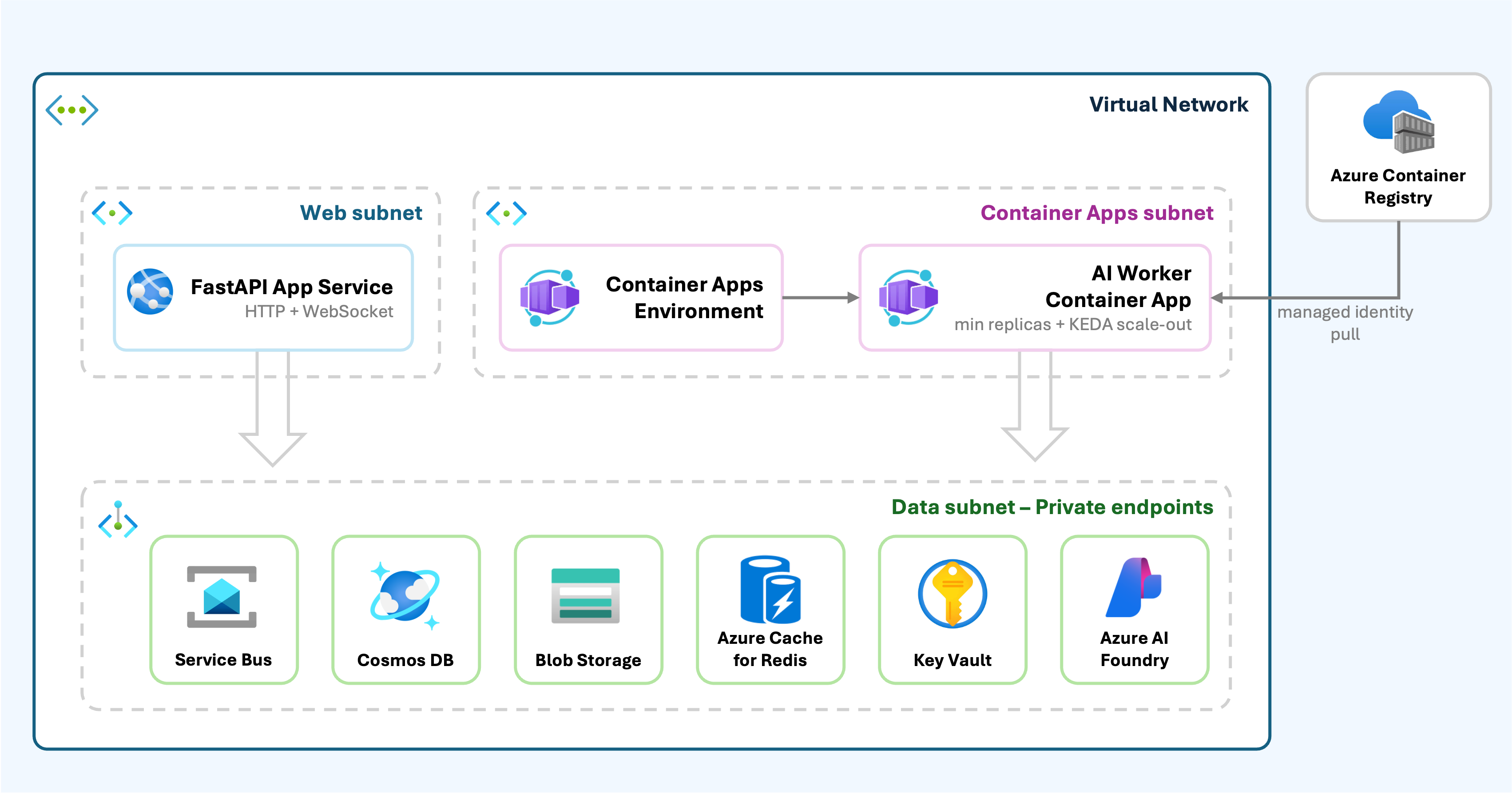
This split means API scaling and worker scaling can be tuned independently. A burst of users connecting to the app does not automatically start more model calls. A burst of queued AI jobs can scale the worker fleet without increasing the web tier.
Queue design
The system uses separate Service Bus queues for major AI capabilities.
The queues use duplicate detection, a five-minute lock duration, dead-lettering on expiration, and a maximum delivery count. The worker uses Service Bus lock renewal because AI jobs can run longer than the initial message lock.
The worker starts one async processor loop per configured queue. All queues share a single per-replica semaphore, so one worker instance cannot overload Azure OpenAI or exhaust memory by running too many workflows concurrently.
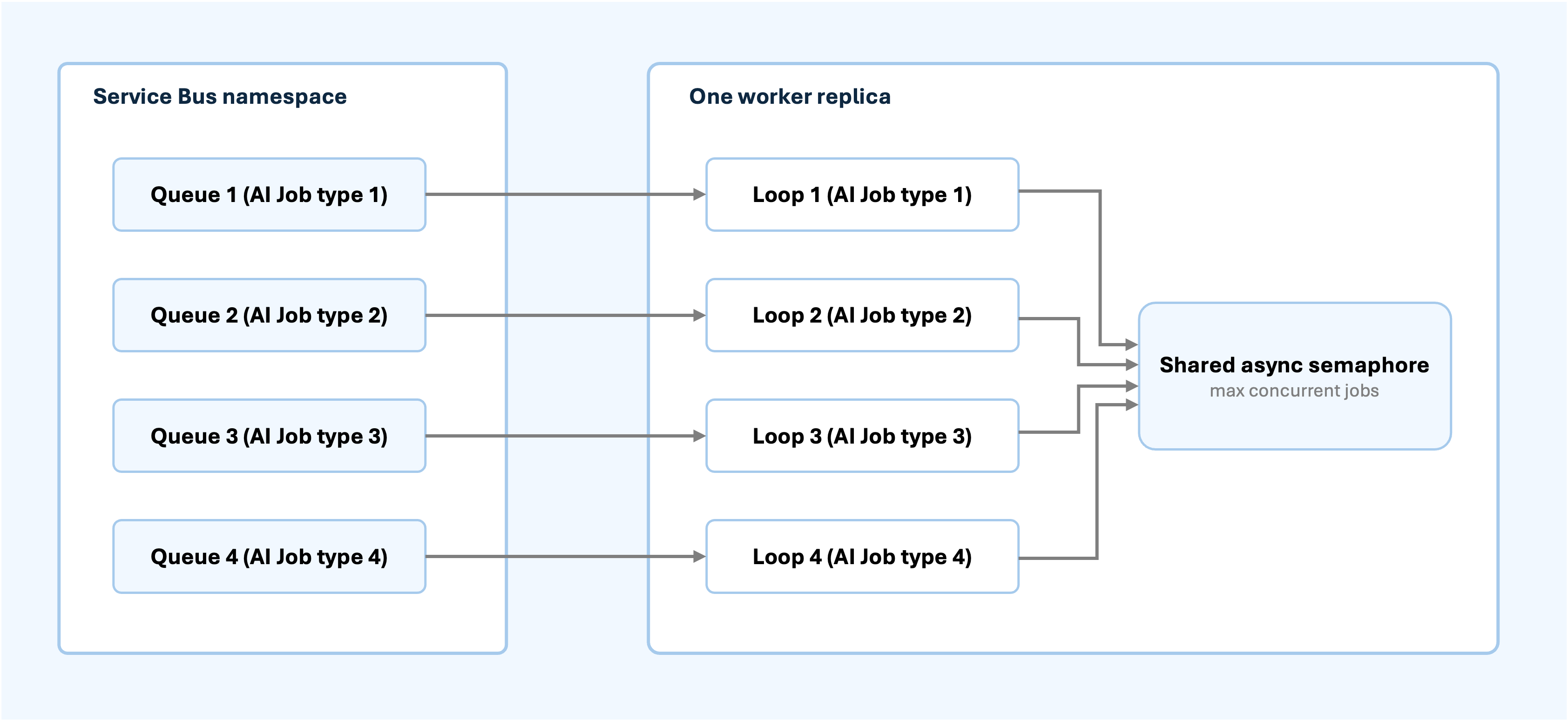
This is a practical pattern for AI workloads. Queue-level scale-out handles backlog, while per-replica concurrency protects model quota, memory, and downstream services.
Job lifecycle
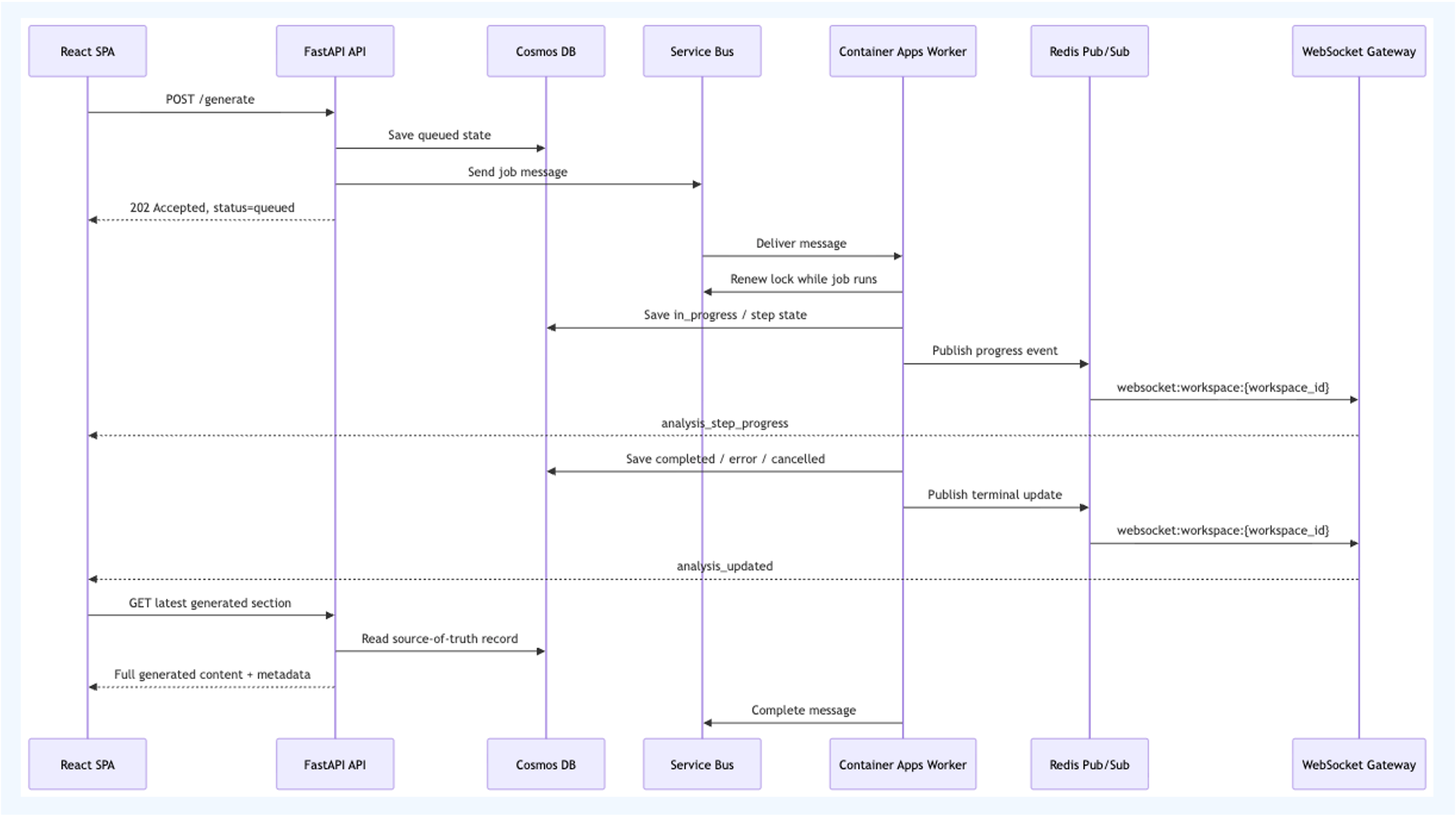
A single AI job follows this lifecycle:
- The frontend calls a generate endpoint.
- The API prepares a generation operation and writes
queuedstatus. - The API sends a Service Bus message.
- A worker receives the message and renews the lock while processing.
- The worker updates the persisted record as it progresses.
- The worker publishes live progress events through Redis.
- The WebSocket gateway broadcasts events to connected browser sessions for the workspace.
- On success, error, or cancellation, the frontend rehydrates the full record over REST.
When processing needs to be retried, the worker abandons the message instead of completing it. Service Bus then redelivers the message under the queue’s delivery policy, with dead-letter handling available for operational review.
If the worker is shutting down, it abandons in-flight messages so another replica can pick them up after the lock expires. That behavior matters during rolling deployments.
Live updates without making WebSockets the database
The update pipeline is deliberately split.
Services emit two kinds of messages:
- status updates, such as
ai_job_type_1_updated,ai_job_type_2_updated, andai_job_type_3_updated; - step progress updates, such as
ai_job_step_1_progress,ai_job_step_2_progress, andai_job_step_3_progress.
The backend publishes these messages to Redis channels keyed by workspace:
websocket:workspace:{workspace_id}Every API instance that has a browser connected for that workspace subscribes to the channel. When a message arrives, the API instance rebroadcasts it only to its local WebSocket connections for that workspace.
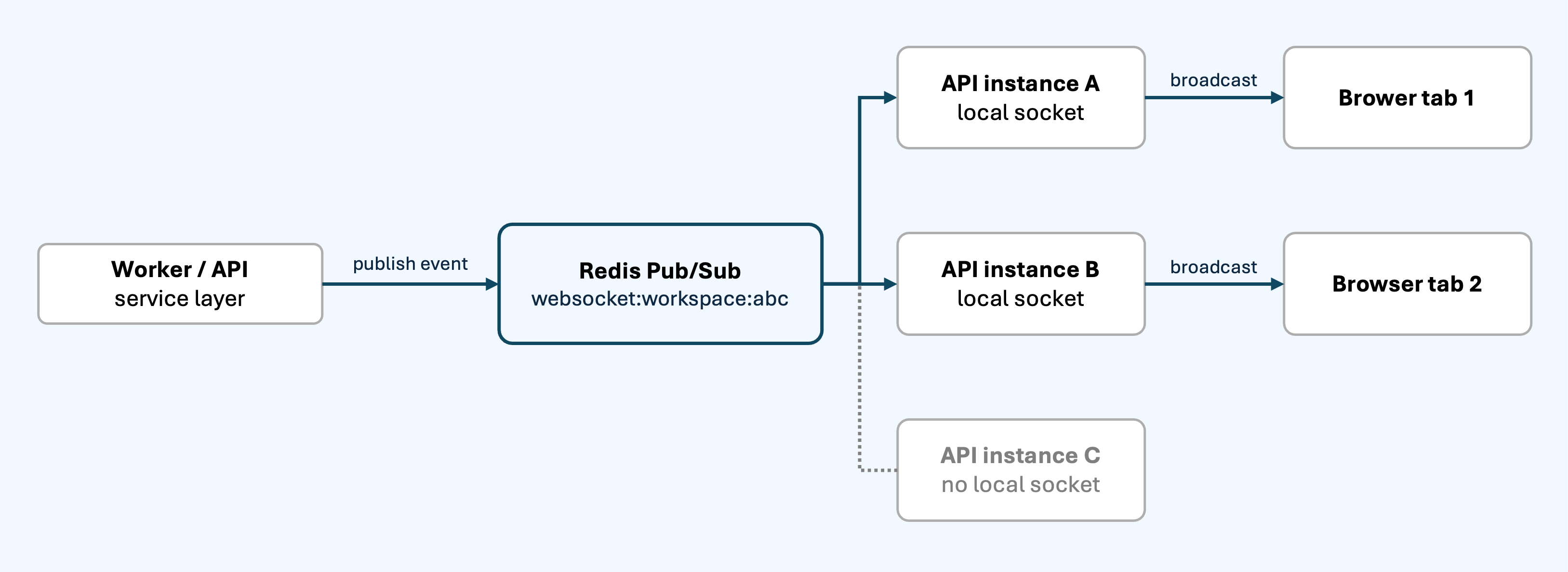
On reconnect, or after a terminal update, the frontend calls the REST API and hydrates the latest state.
The frontend also protects itself from race conditions. Terminal events include updated_at, and hydration responses are compared against the current browser record. If an older REST response arrives after a newer WebSocket update, the frontend keeps the newer state.
This “event as hint, database as truth” rule is one of the most important parts of the design.
Cancellation
Cancellation is handled as a distributed control signal.
When the user cancels a job, the API:
- marks the persisted record as cancelled;
- writes a cancellation key in Redis;
- includes the operation ID where supported, so stale work can be distinguished from the current generation;
- emits a terminal update to the frontend.
The worker checks the persisted row and the Redis cancellation key between steps. If cancellation is detected, it stops the workflow, writes cancelled state, emits an update, and clears the cancellation key.
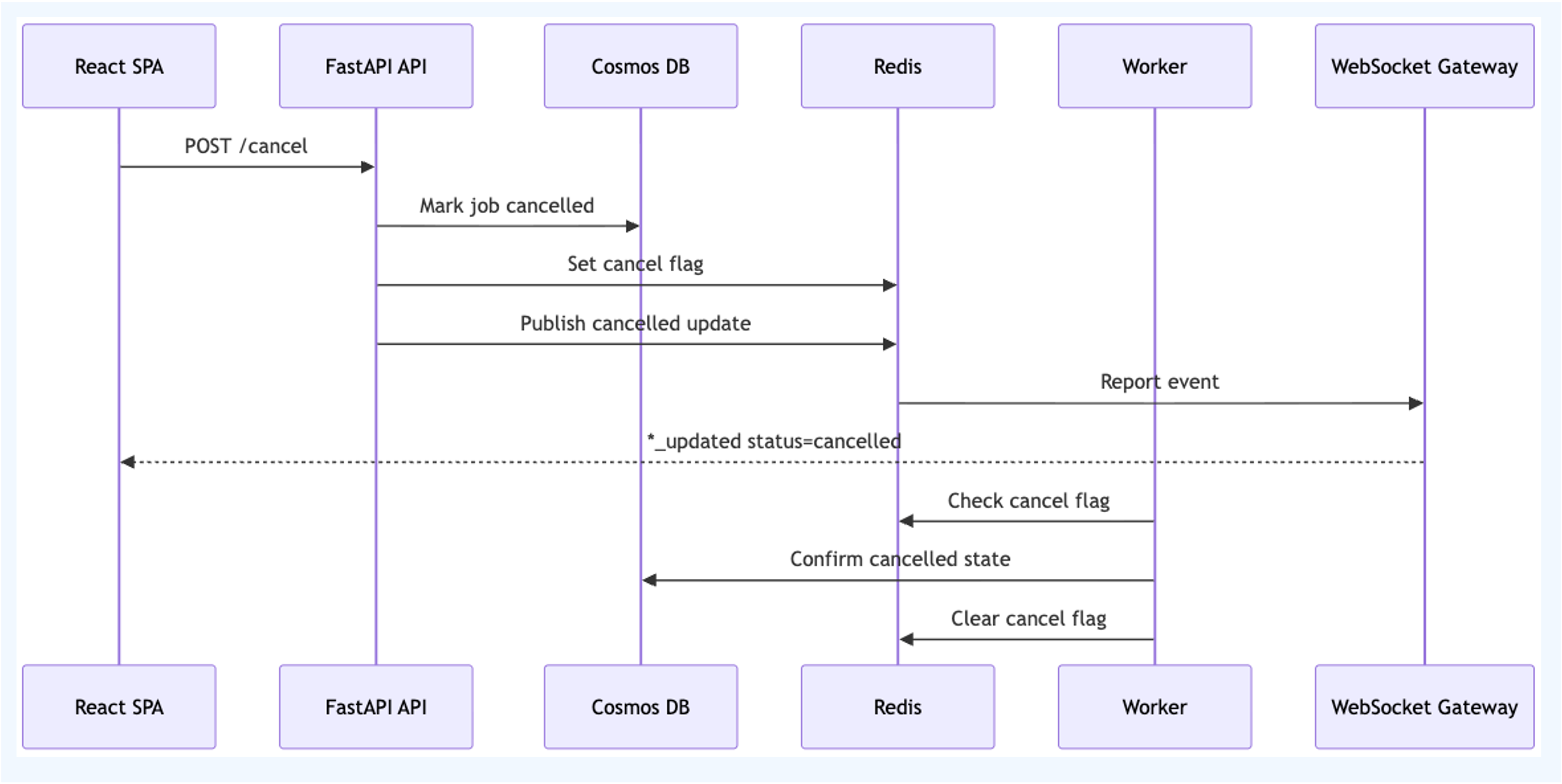
Operation IDs are important. Without them, a cancellation from an older generation can accidentally affect a newer retry. With operation-scoped cancellation, workers can skip stale messages safely.
Dependency-gated batch analysis
The most interesting workflow is dependency-gated batch generation.
Some generated sections depend on others. Dependency gating lets the system run the available sections immediately while holding dependent sections until their inputs are ready.
At batch start, the API resolves the dependency graph and enqueues only sections whose dependencies are already satisfied. As each section reaches a terminal state, the worker updates batch state in Redis. If that completion unblocks dependent sections, the service atomically takes those newly unblocked sections and enqueues them to Service Bus.
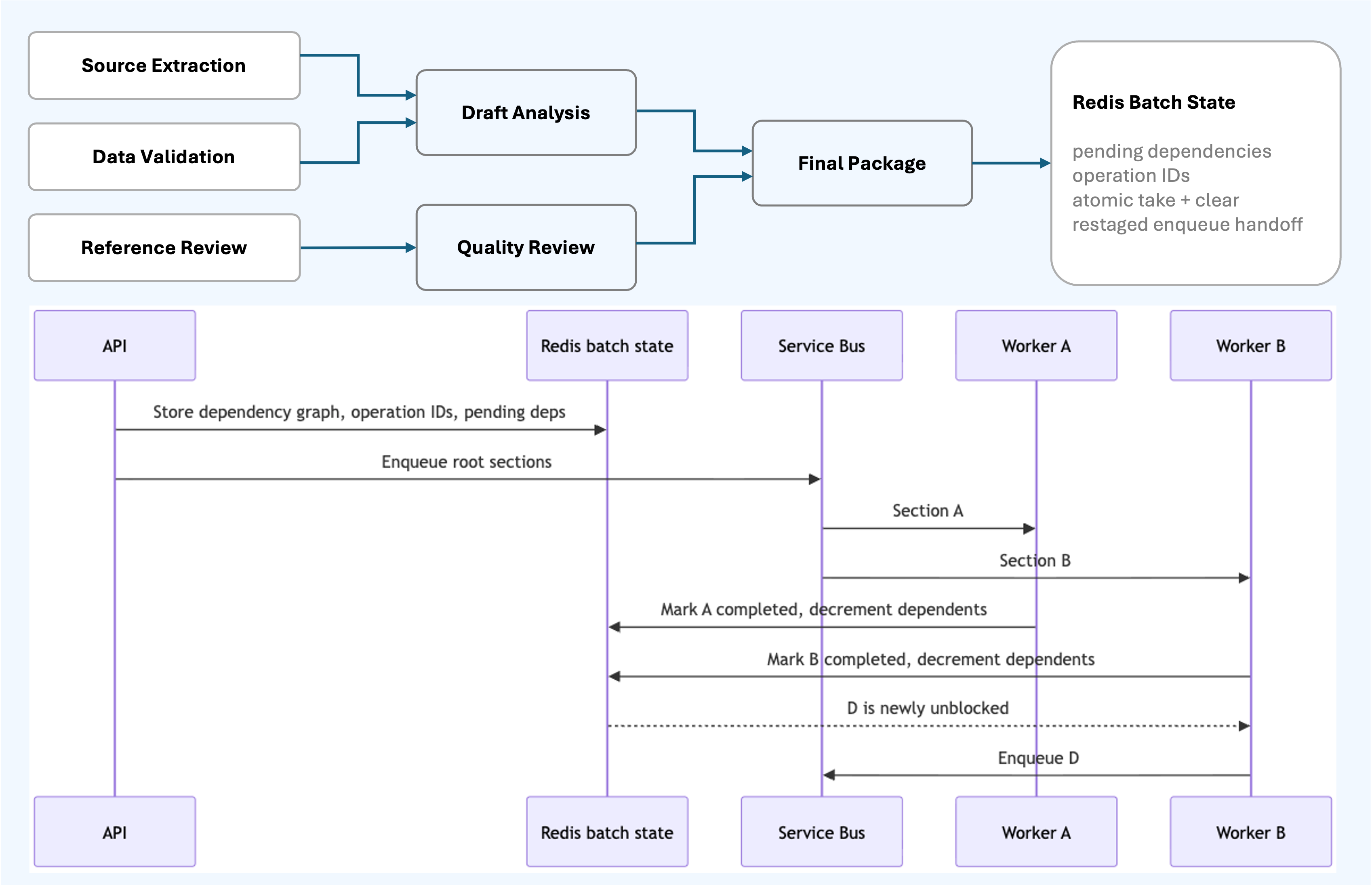
The important implementation detail is that dependency bookkeeping uses an atomic “take and clear” update in Redis. That prevents two workers from double-enqueuing the same newly unblocked section.
The enqueue handoff is also restaged in Redis when it needs another attempt, so dependency progress is not lost between workers. Service Bus duplicate detection provides another layer of protection for partial-send ambiguity.
What this architecture enables
The result is a system where each runtime has a clear responsibility.
The browser can reconnect and hydrate from persisted state while the job keeps running independently in the worker fleet.
API instances can scale and recycle independently because queued work remains in Service Bus and browser WebSocket sessions can reconnect to any healthy instance.
Workers can be rolled forward safely because in-flight messages are abandoned and redelivered through Service Bus.
Live progress stays fast through Redis Pub/Sub, while Cosmos DB holds the recoverable state for every meaningful transition.
Operation IDs let the worker distinguish the current generation from older queued work, so user retries and regenerations remain predictable.
This is the difference between “we run a background task” and “we operate an AI workflow system.”
The broader lesson
Production AI systems need more than model calls. They need workflow boundaries.
Azure Service Bus gives durable work orchestration. Azure Container Apps gives a scalable worker runtime. Cosmos DB gives recoverable state. Redis Pub/Sub and WebSockets give users a live experience. REST hydration keeps the browser aligned with the persisted source of truth.
That combination is the architecture pattern worth reusing:
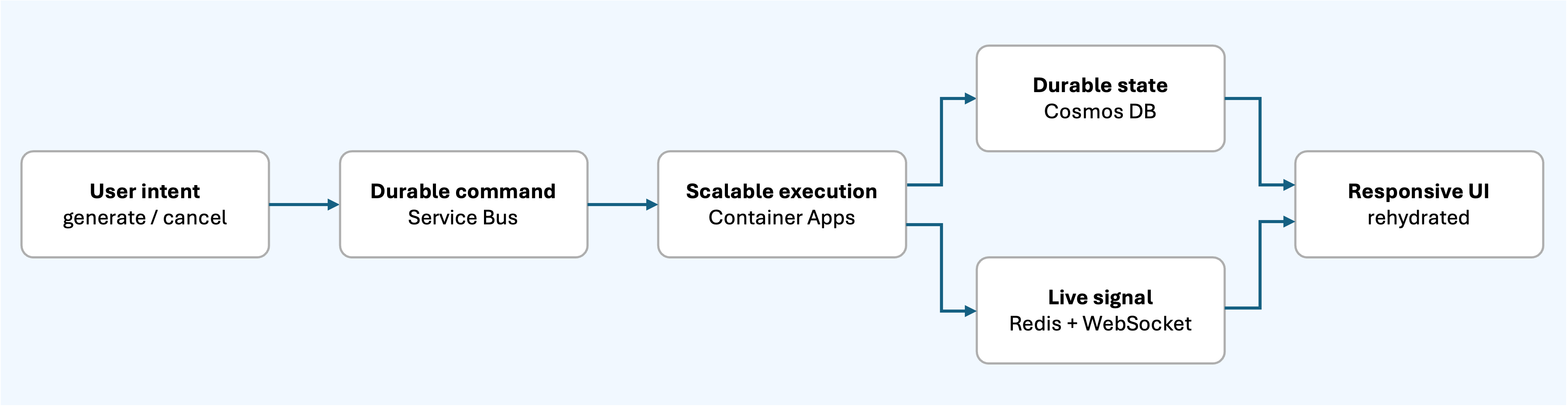
For long-running AI jobs, the goal is not to make everything synchronous or perfectly real time. The goal is to make work durable, progress visible, retries safe, cancellation explicit, and recovery boring.
That is what this architecture gets right.